Generate a discharge letter with medical coding suggestions (video)
In one minute: pick the discharge letter template, enable Swiss DRG or PMSI coding, add the ward notes and documents, and get a letter with coding suggestions. Video in French.
 Dr. Alice Gilson·Doctor & Managing Director 2 min read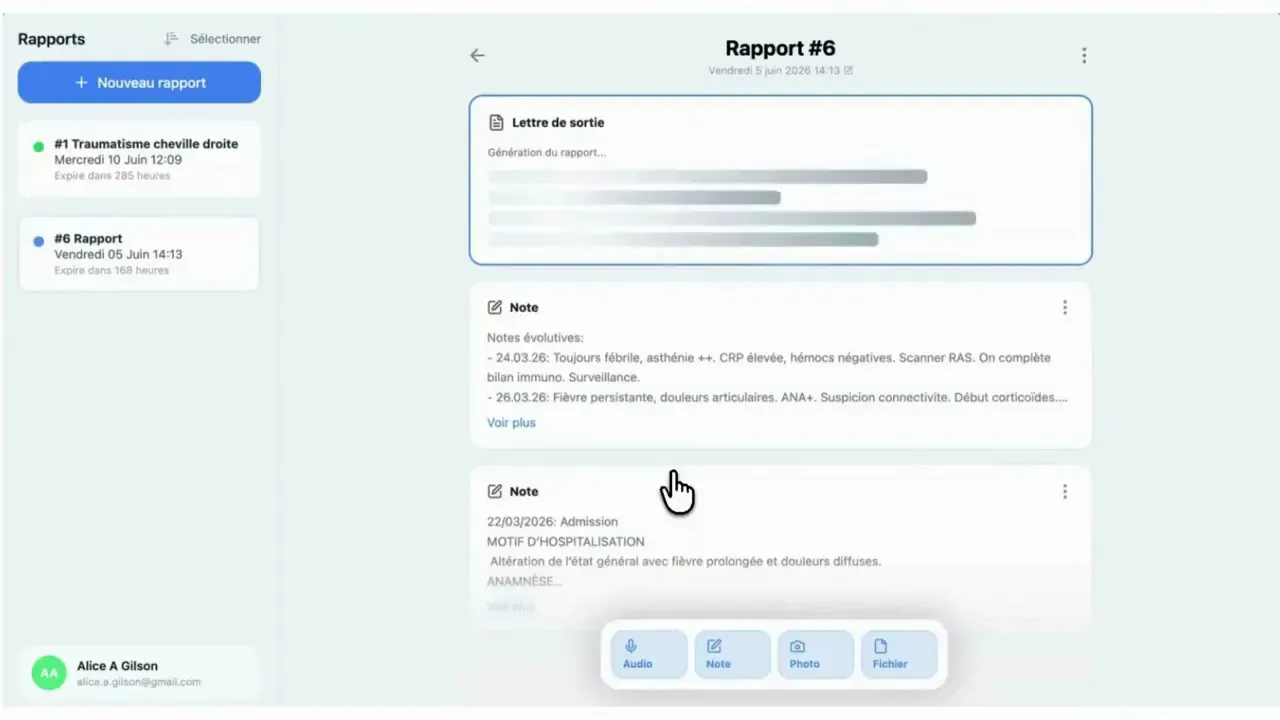
DocNote is not only for outpatient consultation notes. It also automates hospital paperwork, and the discharge letter is the most requested example. This one-minute video (in French) shows how to produce one from the patient’s file, with medical coding suggestions at the end. Here are the steps.
1. Select the discharge letter template
In the dropdown menu when you create a new consultation, choose “Discharge letter”. The template already contains the sections a discharge letter is expected to have, so the generated document follows the usual structure.
2. Enable coding suggestions (optional)
Before generating, you can open the settings and, under medical coding suggestions, select Swiss DRG or PMSI depending on where you practice. When this is on, DocNote appends a coding suggestion at the end of every discharge letter: relevant ICD-10 diagnoses and CHOP or CCAM procedures, drawn from the content of the letter itself.
The suggestion is exactly that, a suggestion. It is meant to give the doctor or the coder a solid starting point, not to replace their validation.
3. Add the hospitalization notes
In the notes section, add the material that describes the stay:
- the progress notes taken during the hospitalization,
- the admission notes,
- other documents such as specialist reports or imaging results.
You can paste text, upload documents or take photos. The more complete this input, the more faithful the letter.
4. Generate, review the coding, share
Once everything relevant has been added, press “Generate report”. The discharge letter is produced, and the coding suggestion appears at the bottom. Review both, edit if needed, then share the report: copy it, email it or send it to your hospital information system if it is connected.
In practice
Writing a discharge letter usually means re-reading a week of notes and rewriting them in a coherent narrative. DocNote does the reading and the first draft, so the doctor’s time goes into checking and signing. Combined with coding suggestions, it also shortens the path to billing.
Related articles

AI-Assisted Nursing Documentation Cuts Time and Boosts Efficiency
In Stud Health Technol Inform., researchers from Chi Mei Medical Center examined the impact of an AI-based documentation tool on nursing workflow and record quality.

Only 10% of emergency physicians' time spent with patients
One might assume that emergency physicians spend most of their time at the bedside. But a time-and-motion study at Bordeaux University Hospital paints a very different picture.
DocNote for medical secretaries: review reports and prepare consultations (video)
One secretary account for several doctors: review and send reports, schedule appointments straight from the day's agenda and prepare patient files. Video in French.